
“How Do I” Series
Our Professional Standards team in collaboration with our MLS® Department have created a helpful “How Do I” series based on feedback from our Members. They will continue to add to this section, expanding the valuable quick-response content for the benefit of our Members.
ADD/Edit – How do I suspend my listing using the PropTx Add/Edit Module?
To suspend your listing, you will log into the PropTx Add/Edit, search your listing under Edit Listing, Select the Change Status from the left side Menu. Under the Change Status field select Suspended. The suspended date field refers to the date the listing was suspended.
Please Note: There is no suspension expiry date option. The listing will NOT automatically update to the previous status or automatically expire as it used to do in the old OREB version of Matrix™. It is the responsibility of the salesperson/Brokerage to edit the listing to ‘previous status’ when the suspension is to end or prior to the expiry of the listing agreement.
ADD/Edit – How do I report a Sale when the Listing is in Multiple Property Types?
In OREB’s MLS® System, there are numerous instances where properties can be listed in more than one Property Type. MLS® Rule 4.01 states, when an MLS® Listing is processed as both a residential and commercial MLS® Listing on the MLS® System, the trade shall be reported for both MLS® Listing numbers by 11:59 p.m. the next Business Day.
MLS® Rules – How do I (Can I) list a property in more than one property type?
As per MLS® Rule 3.10, Only one (1) MLS® Listing for any one (1) trade function signed by the same Seller may be placed on the MLS® System at any one (1) time. The following are examples of what are considered separate trade functions under this Rule:
- Sale/Lease;
- Furnished/Unfurnished; and
- Sale by property Owner/Power of Sale.
For Commercial MLS® Listings, up to three (3) Property types are permitted on the MLS® System at the same time. Properties with both Residential and Commercial uses may be listed in both Residential and Commercial classes.
PropTx FAQ
Will our association’s MLS® rules change with PropTx?
Yes. New MLS® Rules came into effect Monday, December 2, 2024. In addition to harmonizing the requirements for REALTORS® using the PropTx platform throughout the province, the new rules offer more clarity and help ensure you and your clients have access to accurate, transparent, and timely data.
Please email standards@oreb.ca if you have any questions.
Does the MLS® Data Information Form need to be signed?
Yes, in accordance with PropTx Rule 3.03, MLS® Listings submitted to the MLS® System shall be completed on current approved MLS® Listing Agreements and MLS® Data Information Form.
When must the Listing Brokerage process MLS® Listings through the MLS® System?
Listings must be processed through the MLS® System by 11:59 p.m. the next Business Day following the Commencement date of the MLS® Listing Agreement. “Business Day” means all days other than Saturday, Sunday, and statutory holidays in the province of Ontario. Where a submission deadline falls on a statutory holiday, the deadline will be extended to the next calendar day that is not a statutory holiday.
Can I refer to another MLS® Listing in the Brokerage Remarks section where the listings could be purchased together?
No, pursuant to PropTx Rule 3.05, the property can be listed together and separately.
Are delayed offers acceptable?
Managing delayed offers are under the purview of RECO and are not addressed in PropTx Rules. Please see RECO’s bulletin: https://www.reco.on.ca/getmedia/4a729e64-a54e-41b8-ad6c-16ae97499219/RECO-Bulletin-4-2-Managing-a-delayed-offer-presentation-process.pdf
MLS® Rules – What is the difference between Right of First Refusal and Sold Conditional Escape Clause? UPDATE: Answer updated as of July 2, 2025
- Right of First Refusal (Disclosed as part of the Listing Agreement)
There is an agreement between the seller and another party (sometimes written, sometimes verbal) regarding the property. Example: A family member or neighbour wishes to have an opportunity to match (or beat) any offer received; condo corp. has the right to approve the agreement or Buyer; a park or community association reviews all Agreements prior to acceptance per park/community regulations. This encompasses any type of agreement that would give a person or entity time to approve or submit an offer once you have an offer in hand on your listing. You would list the property as Active and note the terms of this First Refusal in the Brokerage Remarks. The listing should remain Active until there is a conditional sale.
- Sold Conditional With an Escape Clause (Disclosed as part of the Agreement of Purchase and Sale (APS))
If you accept an Agreement of Purchase and Sale on your listing that includes a condition with an escape clause, update the listing to Sold Conditional Escape. When you accept an APS with an escape clause, the listing status of (SCE) must be reflected on the listing for accuracy and transparency.
PropTx MLS® rule 4.02 The sale, lease or sub-lease of a residential or commercial MLS® Listing shall be reported by the Listing Brokerage through the MLS® System, whether conditional or firm, by 11:59 pm the next Business Day following acceptance of an Offer. Members shall not be permitted to avoid these notice obligations to the Association by, for example, cancelling a MLS® Listing between receipt (or anticipated receipt) and acceptance of an Offer, or encouraging a Seller to do so.
All changes in the status of a Reported conditional sale on the MLS® Listing shall be Reported by the Listing Brokerage on the MLS® System by 11:59 pm the next Day following the change.
Where do I specify special assessments for condos, seller’s rights reserved and mere postings?
This information can be placed in the Brokerage Remarks field on the MLS® listing.
I am co-listing with another brokerage, where do I add this information on the listing?
You can add the co-list Brokerage and Salesperson as the 2nd list agent on the listing.
Can I include a picture of the neighbourhood park in my Listings?
Only images of surrounding amenities that are in view of the listed real estate can be included on the MLS® Listing.
Can I include digitally altered images on an MLS® Listing?
PropTx Rules require that the images accurately depict the listed real estate.
If I have an MLS® Listing processed as both a residential and commercial MLS® Listing on the MLS® System and the real estate has sold, should I report the trade on both MLS® Listing numbers?
Yes, in accordance with PropTx Rule 4.01, the sale should be reported on both MLS® Listings.
ADD/Edit – What will the status selections be in PropTx?
The status selections will be as follows:
DFT = Deal Fell Through (to be used when a sale falls through and you wish to suppress the sold price)
EXT = Extended (to be used to extend the expiry of your listing)
NEW = New (will remain in new status until the status is updated to a different status)
PC = Price Change
SC = Sold Conditional (listing will appear as Active on Realtor.ca)
SCE = Sold Conditional Escape Clause (listing will appear as Active on Realtor.ca)
EXP = Expired
SLD = Sold
SUS = Suspended
TER = Terminated
ADD/Edit – How to list a property with a Secondary Dwelling Unit (SDU)
When listing a property that contains a Secondary Dwelling Unit, the property must be listed how it’s registered.
NOTE: A property that is registered as a Single-family with a Secondary Dwelling Unit may not be listed as a Duplex.
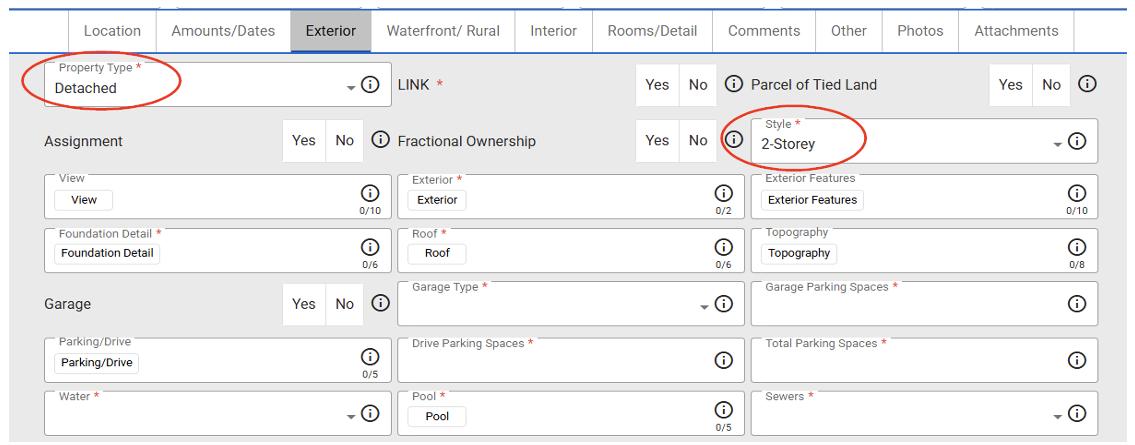
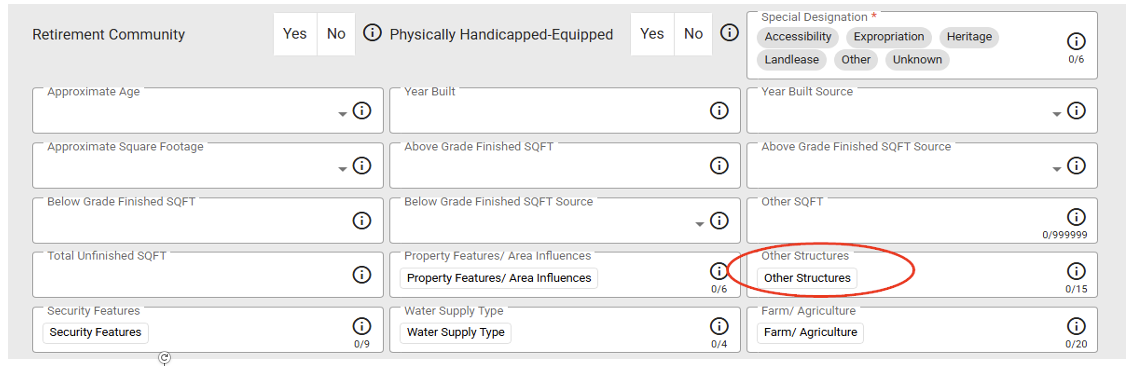
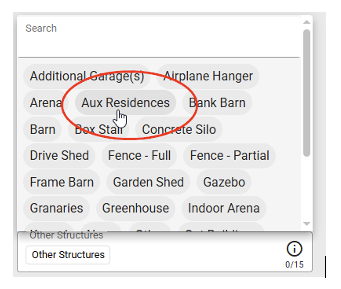
Example: For a property that is registered with MPAC as a single-family dwelling but also has a secondary dwelling unit, is required to be listed as a single-family dwelling. You can accommodate for the SDU by adding the details to the listing Remarks field and selecting Aux Dwelling in the Other Structures field. To do this, you will select the Property type field to reflect ‘Detached’, the Property Style field to reflect ‘2 Storey’, then you would select the Other Structures field and then select ‘Aux Dwelling’. (see below)
MLS® Rules – Exclusive & MLS® Listings?
Best Practice: Members should use separate Listing Agreements for Exclusive and MLS® listings.
ADD/Edit – Washrooms Fields Explained
Washroom pieces are defined by the use of the item. A tub/shower combination would be two pieces since it has two separate functions. A double sink vanity would be two pieces since the sinks can function independently of each other.
The # of Washrooms field refers to how many washrooms have the # of Pieces indicated on the Level indicated.

Offering practice suggestions, educating all Eastern Regional Members and serving as a resource to help all of our Members succeed.

Professional Standards: FAQ
Our FAQ section will continue to grow as our Professional Standards team receives more valuable content from our expanded Eastern Partner Board Members.
How do I file a complaint?
The Eastern Regional Professional Standards Complaint Form can be found here.
If you have a complaint, you will need to fill out the Complaint Form with as many details as possible; attach any pertinent documents to the complaint (such as emails, correspondence, contracts, etc.), and press submit. If you have additional support documentation that did was not submitted with the form, please send it by email to standards@oreb.ca.
Your complaint will be passed along to a Professional Standards Sub-Committee who will determine whether your complaint falls within the jurisdiction of the Ottawa Real Estate Board (on behalf of the Eastern Regional Boards), the Real Estate Council of Ontario, or both. If the Sub-Committee determines that your complaint falls within OREB’s jurisdiction, it will be passed along to the Professional Standards Committee for their review and action.
The Board follows the principles of natural justice and due process, which allows the other party a chance to respond to the complaint. A copy of the complaint is forwarded to the person named in the complaint.
Once a complaint file has been filed, what happens next?
The complaint process can be found here.
What are the principles of natural justice and due process?
Natural justice is technical terminology for the rule against bias and the right to a fair hearing. The Professional Standard Committee (“PSC”) and Discipline Committee have procedures in place to reduce or eliminate bias. These include:
- limiting the number of Committee Members from the same Brokerage;
- automatically excluding Committee Members from the discussion and decision process when the party being discussed is a member of the same Brokerage;
- offering Committee Members, at the beginning of each PSC meeting, the opportunity to declare potential bias and recuse themselves from discussion about specific matters;
- when empanelling Discipline Committee Members for a Discipline Hearing, potential Panelists are offered the opportunity to declare potential bias and recuse themselves from the process;
- Respondents to a complaint are offered an opportunity to object to Panelists for a Discipline Hearing; and
- the right to appeal decisions made by the Discipline Committee.
Due Process can be defined as a course of formal proceedings carried out regularly and in accordance with established rules and principles. The Ottawa Real Estate Board ensures due process by:
- having a clearly defined process to be followed when a complaint is received, as detailed in the Rules and Regulations Governing Complaints (found here) and
- holding a regular monthly meeting of the Professional Standards Committee.
Can I be excluded from seeing a property listed on the PropTx MLS® System?
The MLS® System is a co-operative system of REALTORS®. All properties listed on the MLS® System must be available for showings by any Board Member. PropTx MLS® Rule 3.07 a) and b) states:
Without limiting the generality of the foregoing and the other provisions of the MLS® Rules, any such MLS® Listing shall not be accepted by the Association as an MLS®Listing:
a) If it excludes any Members from showing the property;
b) If it excludes any Members from acting as a Co-operating Brokerage;
What is a “Stigma” and what would be considered a “Stigmatized Property”?
RECO’s Registrar’s Bulletin dated December 1, 2023 discusses Stigmas and Stigmatized Properties.
In the context of real estate, a “stigma” is a non-physical, intangible attribute of a property that may elicit a psychological or emotional response on the part of a potential buyer.
The legislation does not define “stigma,” but examples may include:
- the property was used in the ongoing commission of a crime (examples, drug dealing or chop shop);
- a death occurred at the property;
- the property was previously owned by a notorious individual (examples, organized crime leader, known murderer);
- there are reports that the property is haunted;
- a former marijuana grow operation that has been remediated according to the local health or building authority.
My listing expired, and the house has been re-listed with another salesperson. Upon reviewing the new listing, I notice that my photos had been taken from my listing and used in the new listing. What can I do?
You should first contact the Listing Salesperson and ask them to remove your photos. If the Listing Salesperson does not remove the photos as requested, you can file a complaint with the Board. The Professional Standards Committee will review the situation and determine appropriate action.
 Eastern Regional Professional Standards